


The landscape of artificial intelligence development is constantly shifting, often marked by the introduction of tools that promise to streamline creation, yet often come with a hefty price tag. Recently, Google AI Studio rolled out a significant update – its new “Build” feature – positioning itself not just as a prototyping sandbox, but as a fully-fledged, free AI app builder. This development demands a closer look, as it could signal a major disruption for both burgeoning developers and established AI solution providers.
For years, robust AI prototyping and development platforms, like the often-pricey Lovable AI, have served as gatekeepers, requiring significant investment or advanced technical expertise. Google’s latest move with the “Build” feature directly challenges this paradigm, offering a simple, yet surprisingly powerful, alternative where users can design, test, and deploy AI applications directly within the Studio environment, all without a subscription fee.
Demystifying the “Build” Tab: A Deep Dive into Google AI Studio
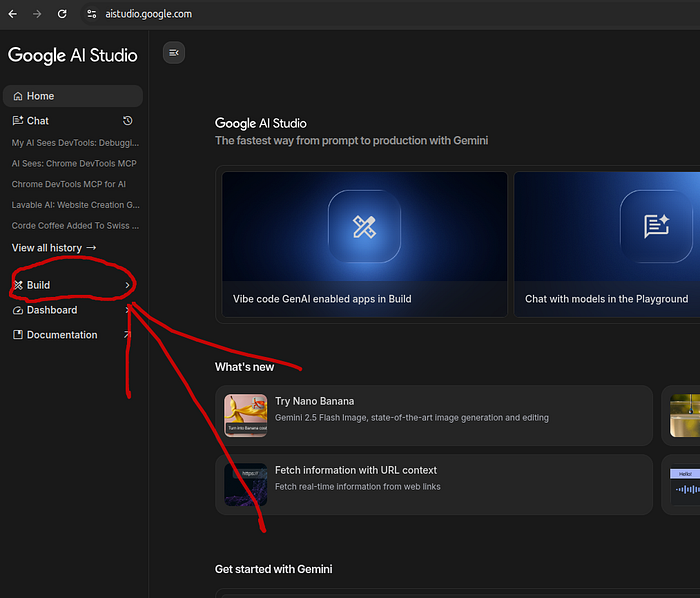
Upon logging into aistudio.google.com, users are greeted by a new “Build” option prominently displayed on the left panel. This isn’t just an aesthetic addition; it’s a gateway to a streamlined development experience.
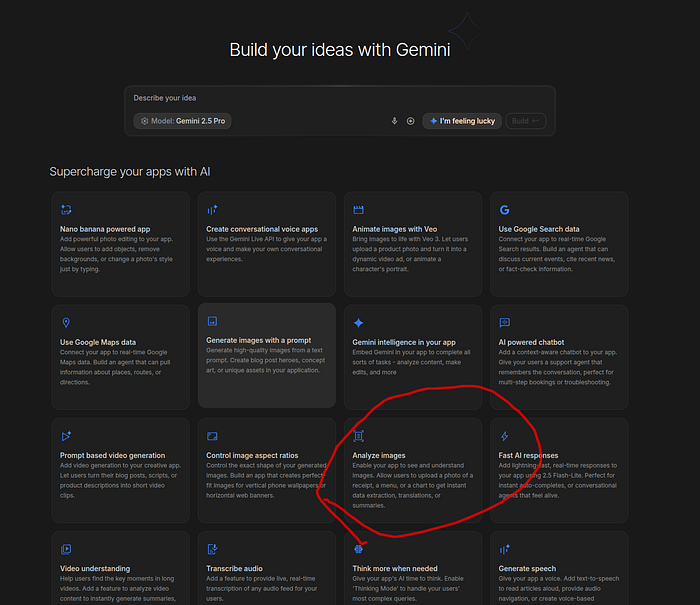
The interface itself is remarkably clean, prioritizing user experience. At its core lies a prompt editor, where an app idea is articulated in natural language. Below this, an array of powerful tools awaits connection, including Image Generation, Google Search, Voice-to-Speech, and the potent Analyze Image capability – a versatile toolkit for diverse AI applications.
Configuring the Intelligence and Frameworks
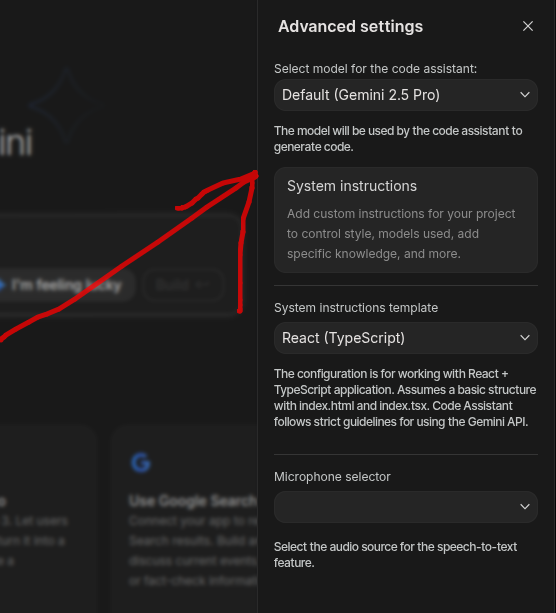
Before crafting the core prompt, a critical step involves configuring the project settings via the Advanced Settings panel. This is where developers fine-tune the brain of their application.
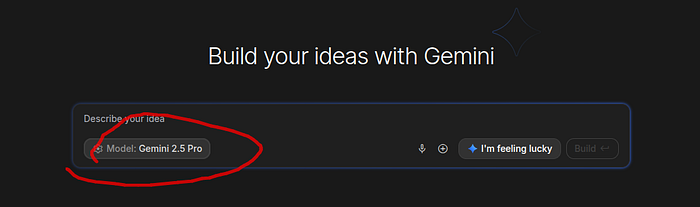
Here, users can:
- Select the underlying Gemini model, choosing between powerhouses like Gemini 2.5 Pro or the efficient Gemini 2.5 Flash, depending on their application’s needs.
- Provide custom system instructions, allowing for precise control over the AI’s behavior and tone.
- Choose a web framework (React or Angular), a crucial decision that dictates the generated application’s structure and frontend technology.
Furthermore, the Studio allows for the upload of context files – PDFs, text, or images – enabling apps to leverage custom data. This capability is particularly valuable for enterprise applications requiring analysis of proprietary documents, codebases, or business intelligence.
The Prompt-to-App Journey
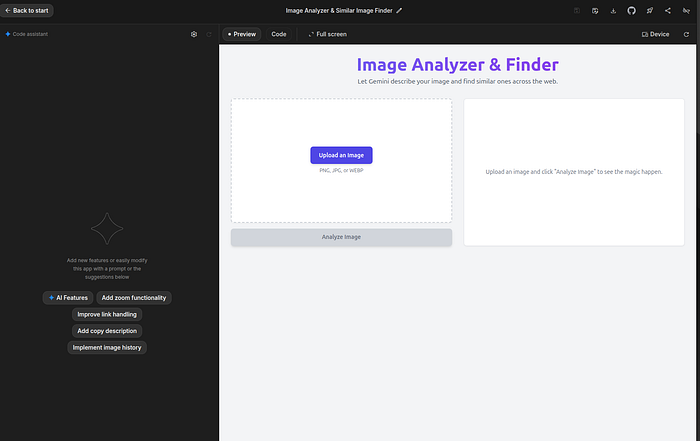
The essence of the “Build” feature lies in its prompt-driven generation. A simple instruction, such as “Build a web application that will describe the image and then find a similar image on the internet,” initiates a complex creation process. Once “Build” is clicked, Google AI Studio springs into action, providing real-time feedback through a chat log detailing each step, while a live preview on the right panel shows the app taking shape dynamically.
This interactive phase is key. Developers aren’t passive observers; they can actively refine their prompts, incorporate AI-suggested improvements, or halt and restart the build if a different direction is needed. This iterative process accelerates development and reduces trial-and-error cycles.
Deployment and Collaboration Made Seamless
Once satisfied with the generated application, users have flexible options for saving and sharing:
- Local Download: The full project files can be downloaded to a local machine, offering complete control and offline access.
- Publish to GitHub: For modern development workflows, direct integration with GitHub is a game-changer. With a few clicks, developers can connect their account, create a new repository, and push their application, making version control and collaborative development exceptionally straightforward.
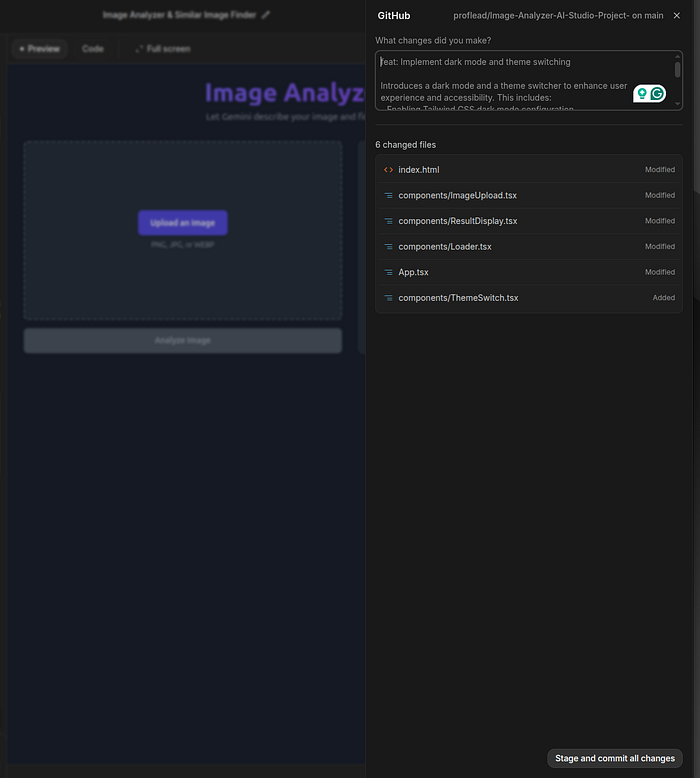
Crucially, the Studio facilitates continuous improvement. Any subsequent enhancements can be committed and updated directly from the interface, maintaining a seamless development pipeline.
The Implications: A New Era for AI App Development?
The “Build” feature fundamentally transforms Google AI Studio from merely a testing ground for models into a comprehensive development tool. Its speed, intuitive design, and, most importantly, its free access, pose significant questions for the broader AI development ecosystem. Is this Google’s strategic move to democratize AI app creation, pulling more developers into its Gemini ecosystem?
By lowering the barrier to entry, Google could ignite an explosion of innovative, niche AI applications that might never have been built due to cost or complexity. But what does this mean for existing paid platforms? Will they be forced to innovate further, or will they be sidelined by a powerful, free competitor? The rise of such accessible tools pushes us to critically examine the future of AI development, where the tools are no longer the bottleneck, but imagination and data become the primary drivers.
As Google continues to refine this offering, it’s clear that the lines between AI experimentation and full-scale application development are blurring. What impact will this “free” paradigm shift have on the commercial viability of specialized AI development platforms, and how will it reshape the skills required to be an AI innovator in the years to come?




![Clean Code: Functions and Error Handling in Go: From Chaos to Clarity [Part 1]](https://techtonic.xpansieve.com.ng/wp-content/uploads/2025/10/Clean-Code-Functions-and-Error-Handling-in-Go-From-Chaos-150x150.png)


