By using this site, you agree to the Privacy Policy and Terms of Use.
Accept
Sign In
TechTonicTechTonicTechTonic
Notification Show More
Font ResizerAa
  • Home Technology
    • Home 2Hot
    • Home 3
    • Home 4
    • Home 5New
  • Technology
    Technology
    Modern technology has become a total phenomenon for civilization, the defining force of a new social order in which efficiency is no longer an option…
    Show More
    Top News
    Apple Jul Announcement: What a Refresh for Macbook
    Sponsored by
    Sponsored by
    Advantages and Disadvantages of Having Smartphone
    December 8, 2021
    Top 10 Best Portable Bluetooth Speakers for Summer Fun
    December 9, 2021
    Latest News
    The Invisible Architect: Why Human Thought Drives True Automation
    October 30, 2025
    The Groundhog Day of AI: When Your Automated Content Just Can’t Get It Together
    October 22, 2025
    Unmasking AI’s Blind Spot: Why “Later” Matters for Language Model Authority
    October 20, 2025
    Beyond the Brain Drain: Why Smart People Reuse Passwords and What Actually Works
    October 15, 2025
  • Gadget
    GadgetShow More
    The History and Future of CAD in Engineering
    From Drafting Boards to Digital Minds: The Transformative Journey of CAD and Its AI-Powered Horizon
    5 Min Read
    The Seven-Step Hostage Situation You Call Onboarding
    Investigating the Onboarding Blunder: When Helping Becomes a Hostage Situation
    12 Min Read
    Why Over-Caching Can Be Just as Bad as No Caching
    Beyond Optimization: Unmasking the Dangers of Excessive Caching
    9 Min Read
    Why SaaS Pricing Pages Fail
    Decoding Disappointment: An Investigation into SaaS Pricing Page Ineffectiveness
    10 Min Read
    Turning the Compiler Into Your Co-Architect
    Architecting Software with the Compiler: Enforcing Contracts Through Type Systems
    16 Min Read
  • Posts
    • Post Layouts
      • Standard 1
      • Standard 2
      • Standard 3
      • Standard 4
      • Standard 5
      • Standard 6
      • Standard 7
      • Standard 8
      • No Featured
    • Gallery Layouts
      • Layout 1
      • Layout 2
      • Layout 3
    • Video Layouts
      • Layout 1
      • Layout 2
    • Audio Layouts
      • Layout 1
      • Layout 2
      • Layout 3
    • Post Sidebar
      • Right Sidebar
      • Left Sidear
    • Content Features
      • Inline Mailchimp
      • Highlight Shares
      • Print Post
      • Inline Related
    • Auto Load Next Posts
    • Sponsored Post
  • Pages
    • Search Page
    • 404 Page
Reading: Perplexity Comet: Investigating the AI Browser That Promises to Redefine Digital Productivity
Share
TechTonicTechTonic
Font ResizerAa
  • Tech News
  • Gadget
  • Technology
  • Mobile
Search
  • Home
    • Home 1
    • Home 2
    • Home 3
    • Home 4
    • Home 5
  • Categories
    • Tech News
    • Gadget
    • Technology
    • Mobile
  • Bookmarks
  • More Foxiz
    • Sitemap
Have an existing account? Sign In
Follow US
  • Contact
  • Blog
  • Complaint
  • Advertise
© 2022 Foxiz News Network. Ruby Design Company. All Rights Reserved.
AIai-browser-2025best-ai-browserchrome-alternative-2025comet-ai-reviewcomet-vs-chromehackernoon-top-storyperplexity-comet-review

Perplexity Comet: Investigating the AI Browser That Promises to Redefine Digital Productivity

AgentKyles
Last updated: October 6, 2025 12:03 pm
AgentKyles
Share
The Complete Guide to Mega Productivity With  Perplexity Comet (100 Shortcuts + 40 Prompts)
SHARE

Imagine a browser that doesn’t just show you the internet, but actively works for you. A browser where your tabs don’t multiply into a chaotic mess, and research isn’t a digital whack-a-mole game. For too long, our browsing experience has been dictated by interfaces designed to maximize clicks and advertising revenue, rather than empower knowledge workers.

Contents
The Browser Reinvented: From Passive Window to Active AgentUnmasking the Productivity Trap: Why Your Current Browser Works Against YouComet’s Arsenal: Core Capabilities That Redefine InteractionFirst Impressions: Onboarding CometMastering Automation: Real-World Applications and PromptsAvoiding Pitfalls: Smart Comet UsageUnlocking Superpowers: Custom ShortcutsThe Paradigm Shift: From Doing to DirectingComet Ecosystem: Access and OptionsYour Call to Action: Experience the Shift

Enter Perplexity Comet, an AI-powered browser that claims to flip this script entirely. Promising to be the first browser built from the ground up for how we’ll work in 2025, Comet positions itself as an intelligent co-pilot, an agentic AI that sees, understands, and executes workflows across the web. But does it live up to the hype? We dug deep to uncover what makes Comet a potential game-changer for productivity.

The Browser Reinvented: From Passive Window to Active Agent

The fundamental premise of Comet is a radical departure from traditional browsers. While Chrome, Edge, and Firefox serve as passive windows, displaying content for you to manually interact with, Comet operates as an active agent. You “think out loud,” and Comet executes complex tasks automatically.

Built on Chromium, it maintains a familiar feel while integrating Perplexity’s powerful AI at its deepest levels. This isn’t merely a browser with bolted-on AI features; it’s a browser reimagined. Instead of you driving the car, Comet acts as a driver who already knows your destination and navigates on your behalf.

Unmasking the Productivity Trap: Why Your Current Browser Works Against You

Our traditional browsing habits are a testament to a system designed for engagement, not efficiency. The familiar cycle of searching, clicking through countless links (often ads), opening dozens of tabs “for later,” and endlessly copy-pasting is a deliberate design choice. Chrome, for instance, earns billions by keeping you clicking, fostering a chaotic environment that masquerades as “research.”

This engagement-driven model leads to fragmented focus, information overload, and the illusion of control while we drown in digital clutter. It’s a system that has trained us to accept terrible browsing experiences as the norm.

Comet’s Arsenal: Core Capabilities That Redefine Interaction

Perplexity Comet brings three core capabilities that significantly enhance the browsing experience, aiming to eliminate context switching and streamline workflows:

  1. Conversational Search That Understands You: Forget the “10 blue links.” Comet’s search delivers AI-synthesized answers with inline citations, pulls from real-time web data, and allows for follow-up questions in a natural conversation. For example, comparing complex tools like Notion, Asana, and Linear based on specific criteria (API access, mobile apps) yields a detailed comparison table with pricing, user sentiment, and cited sources in seconds.
  2. Multi-Tab Intelligence That Eliminates Context Switching: The @tab reference system is a revelation. Instead of manually switching between windows and copy-pasting, you can directly reference any open tab within your query. This allows Comet to understand and link information across your entire browsing context seamlessly.
  3. Voice Mode for Hands-Free Everything: Activating Voice Mode (Shift + Alt + V) transforms the browser into a powerful assistant for complete workflows. Whether it’s summarizing an article, drafting an email, or checking your calendar, Comet executes tasks without you touching the keyboard. It maintains conversation context, allowing for refined requests and genuinely hands-free operation.

First Impressions: Onboarding Comet

The initial setup for Comet is remarkably smooth. With a single click, it imports bookmarks, passwords, extensions, and history from Chrome, getting you up and running in under a minute. However, this brilliance comes with a caveat: it only imports one Chrome profile. Power users juggling multiple profiles (personal, work, side projects) will face manual setup for the rest, which can be frustrating. Additionally, the persistent notifications to make Comet your default browser can become a nuisance.

Mastering Automation: Real-World Applications and Prompts

The true power of Comet lies in its ability to automate repetitive and time-consuming tasks. Users report significant time savings across various domains:

  • Morning Routines: A simple “Good morning. What do I need to know today?” can trigger a summary of calendar events, priority emails, relevant industry news, and important tasks.
  • Email Management: Commands like “Show me emails needing responses today, grouped by urgency” or “Draft a polite decline for this meeting” revolutionize inbox triage.
  • Research Sessions: Instead of juggling dozens of tabs, complex research (e.g., “Research competitor pricing for Notion, Asana, Linear and compare features in a table”) is handled automatically.
  • Shopping: From finding the best prices for products to ordering ingredients from a recipe, Comet streamlines the entire shopping experience.
  • Content Creation: Prompts such as “Research AI in healthcare trends, extract 10 examples, 5 expert quotes, key stats—organize by subtopic” generate comprehensive briefs ready for content development.

The article provided 40 prompts demonstrating Comet’s versatility for students, business professionals, content creators, developers, e-commerce, travel, finance, and general automation. These examples highlight the potential for Comet to act as a specialized assistant for virtually any online workflow.

Avoiding Pitfalls: Smart Comet Usage

While powerful, Comet is still evolving, and users should be aware of common mistakes:

  • Simple Lookups: Avoid using Comet for basic queries like “what time is it in Tokyo.” Its full AI response adds latency where instant answers suffice; reserve it for complex tasks.
  • Monster Prompts: Break down intricate, multi-step requests into smaller, manageable commands to prevent failures.
  • Over-Granting Access: Begin by connecting only one service (e.g., Gmail) and thoroughly test it before adding more connectors like Calendar or GitHub to mitigate security risks.
  • Expecting Perfection: As beta software, Comet may occasionally hallucinate or fail tasks. Always manually verify critical actions, especially financial or legal ones.

Unlocking Superpowers: Custom Shortcuts

One of Comet’s most underused yet impactful features is custom shortcuts. These reusable commands condense complex prompts into single words, saving significant time daily.
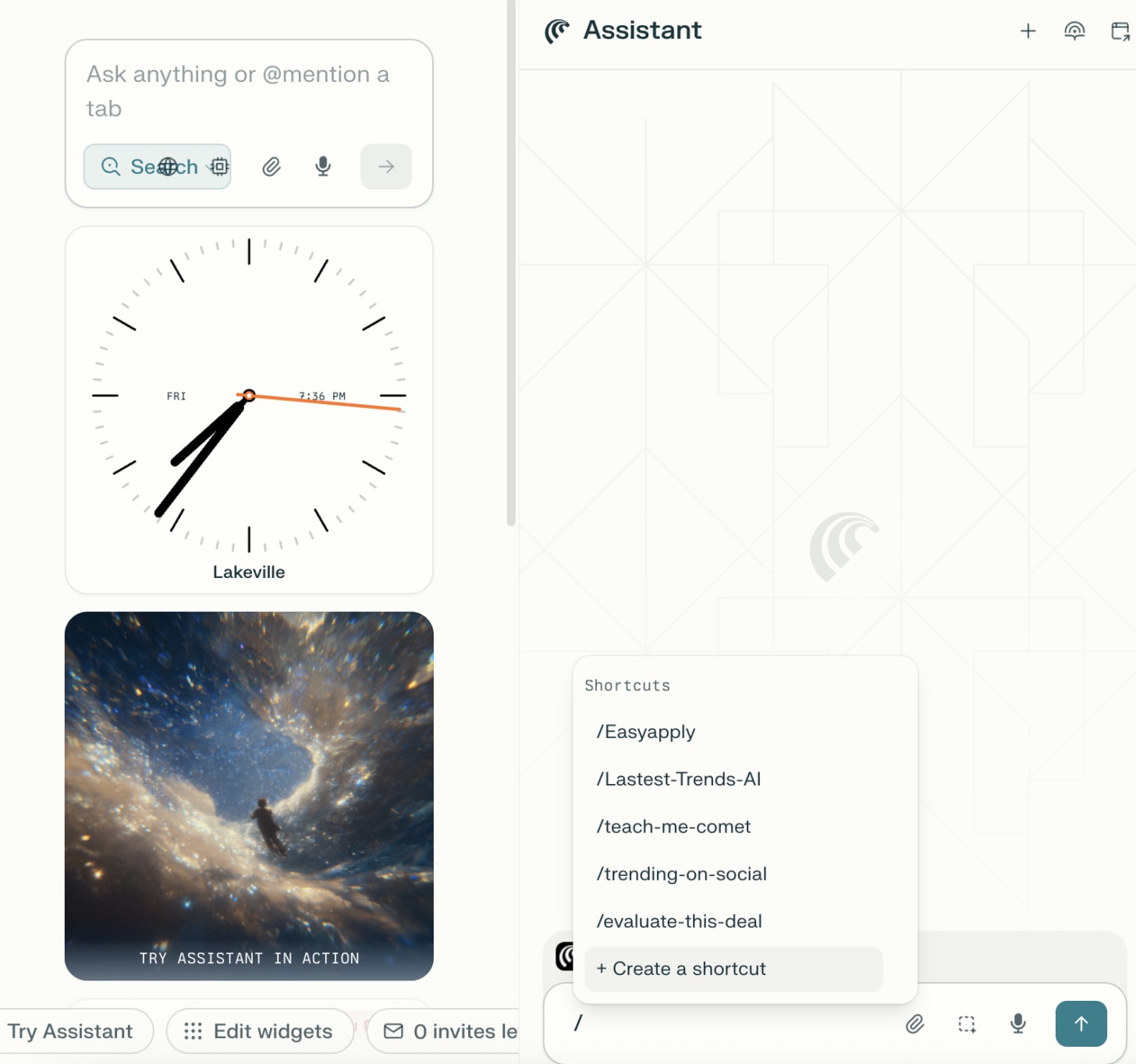

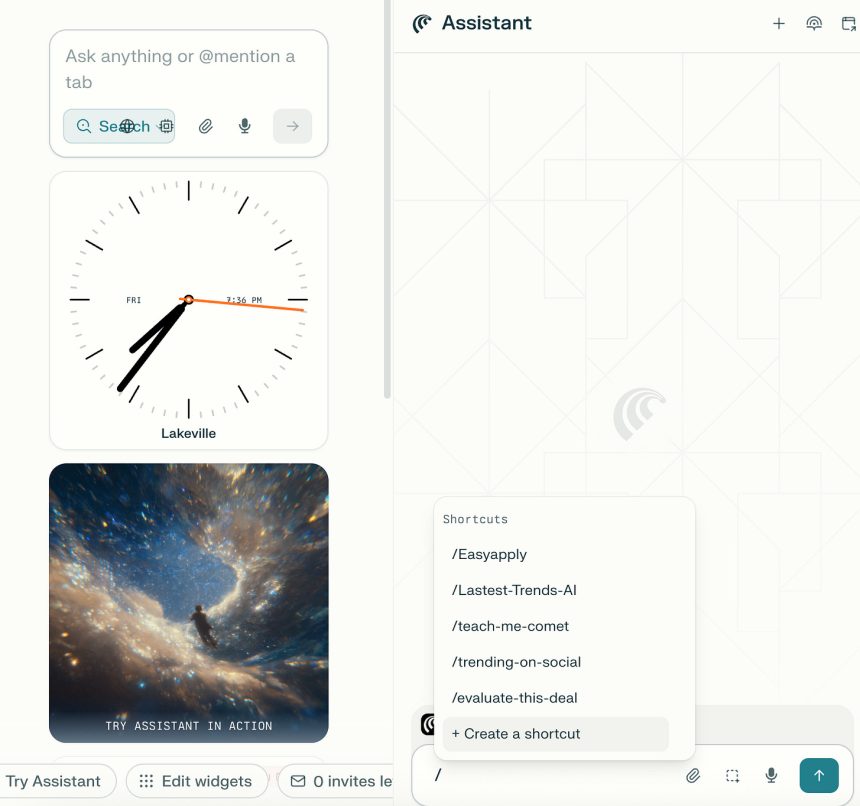
Screenshot of Comet's shortcut menu interface.

To create a shortcut, simply type / in the Comet Assistant sidebar, then click “Create New Shortcut.” You’ll define a short trigger word and the full, detailed prompt Comet will execute. For instance, /summarize could execute “Summarize this webpage in 3 bullet points focusing on key takeaways and actionable insights. Include one-sentence context for each point.”
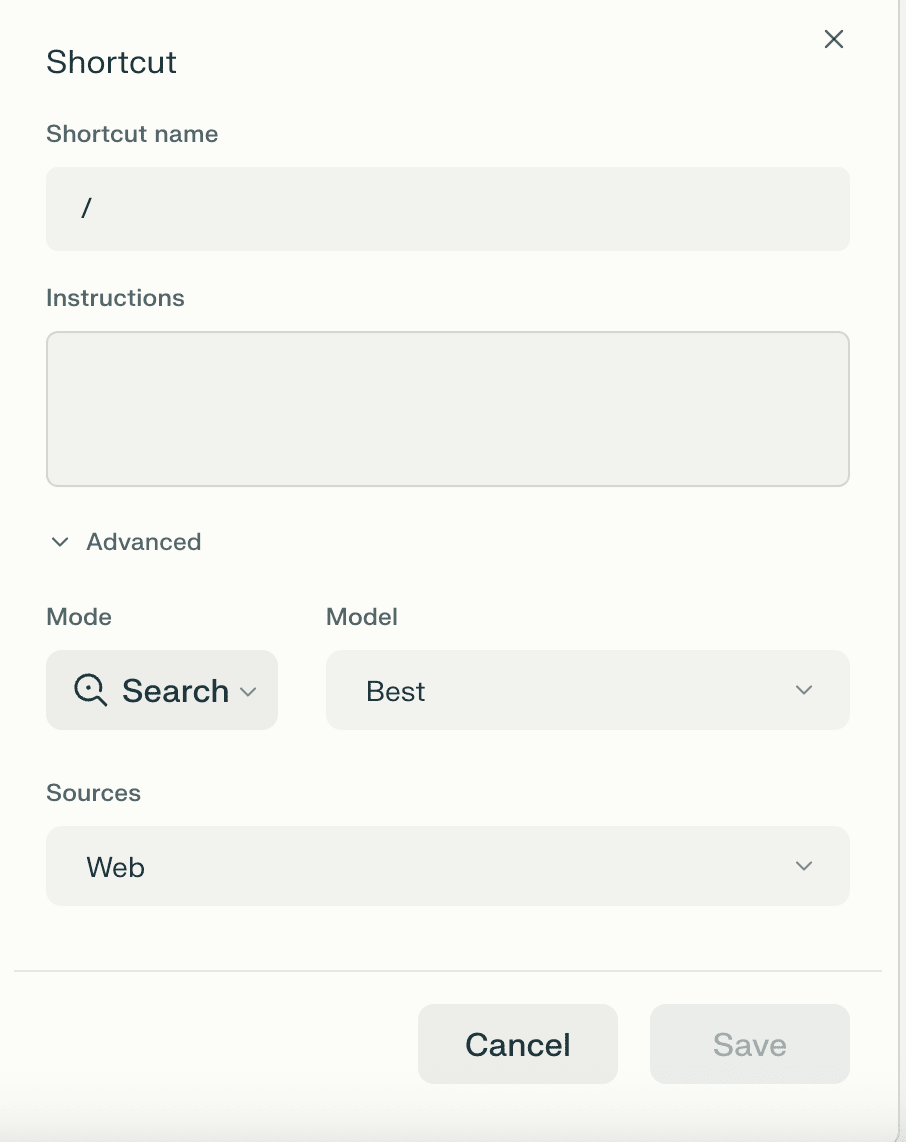

Screenshot showing the creation of a new shortcut with trigger and full prompt fields.

The key is to be hyper-specific in your prompts, including desired output formats and constraints. Testing and refining are crucial for optimal results.
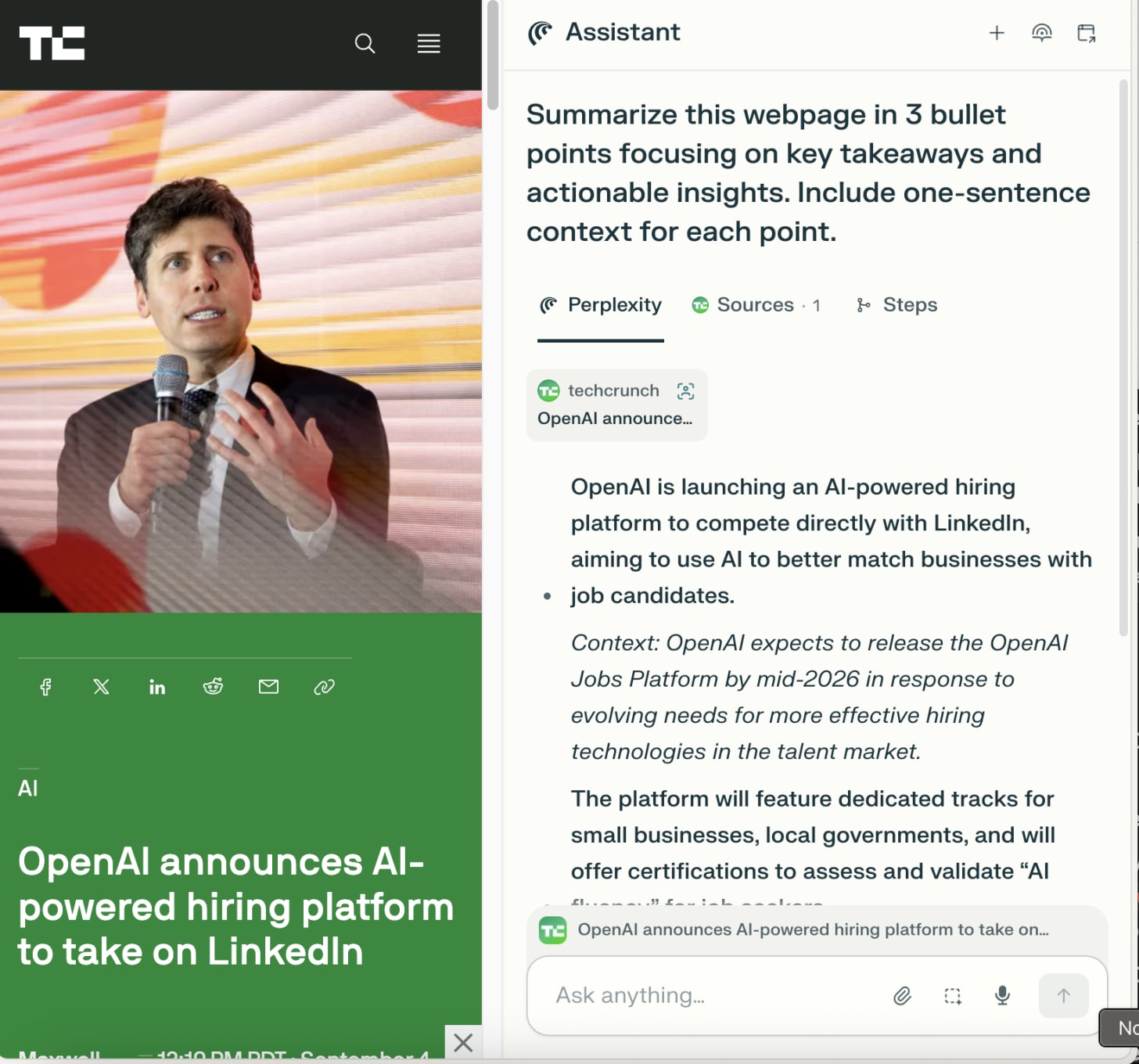

Screenshot demonstrating the specific details of a 'summarize' shortcut prompt.

The article detailed 100 essential shortcuts, covering daily productivity, tab management, email, research, shopping, finance, development, and communication. These range from `/daily-brief` for morning updates to `/code-debug` for developers, illustrating the immense potential for personalization and efficiency gains.

The Paradigm Shift: From Doing to Directing

The most profound impact of Comet isn’t just time saved, but a fundamental shift in mindset. The old paradigm of reactive information consumption—where you navigate, search, read, process, and execute—is replaced by intentional information delegation. With Comet, you think, ask, and delegate, allowing the AI to synthesize and complete tasks while you focus on high-value cognitive work.

This transformation reclaims hundreds of hours annually that were previously spent on “browser plumbing.” More importantly, it preserves precious attention, allowing users to maintain focus on strategy and creative thinking rather than manual, mechanical busywork. Even if a task could be done slightly faster manually, delegating it to AI frees up mental energy for what truly matters.

Comet Ecosystem: Access and Options

Perplexity Comet is now open for all users and can be downloaded from perplexity.ai/comet.

It operates under a tiered pricing model:

  • Comet (Core Browser): Free for all, no waitlist or subscription needed.
  • Comet Plus (Premium Publisher Access): An optional $5/month for access to partner publisher content (e.g., CNN, Washington Post, Fortune) directly within the browser.
  • Perplexity Pro Plan: At $20/month (or $200/year), this plan includes premium AI models, unlimited Pro searches, file uploads, faster responses, and broader platform features beyond just Comet.
  • Perplexity Max Plan: Aimed at power users and enterprises, this $200/month (or $2,000/year) plan offers the highest limits, priority support, experimental features, and early access to new tools.

Essential connections for full functionality include Gmail, Google Calendar, GitHub, and Notion, enabling comprehensive automation across various digital tools.
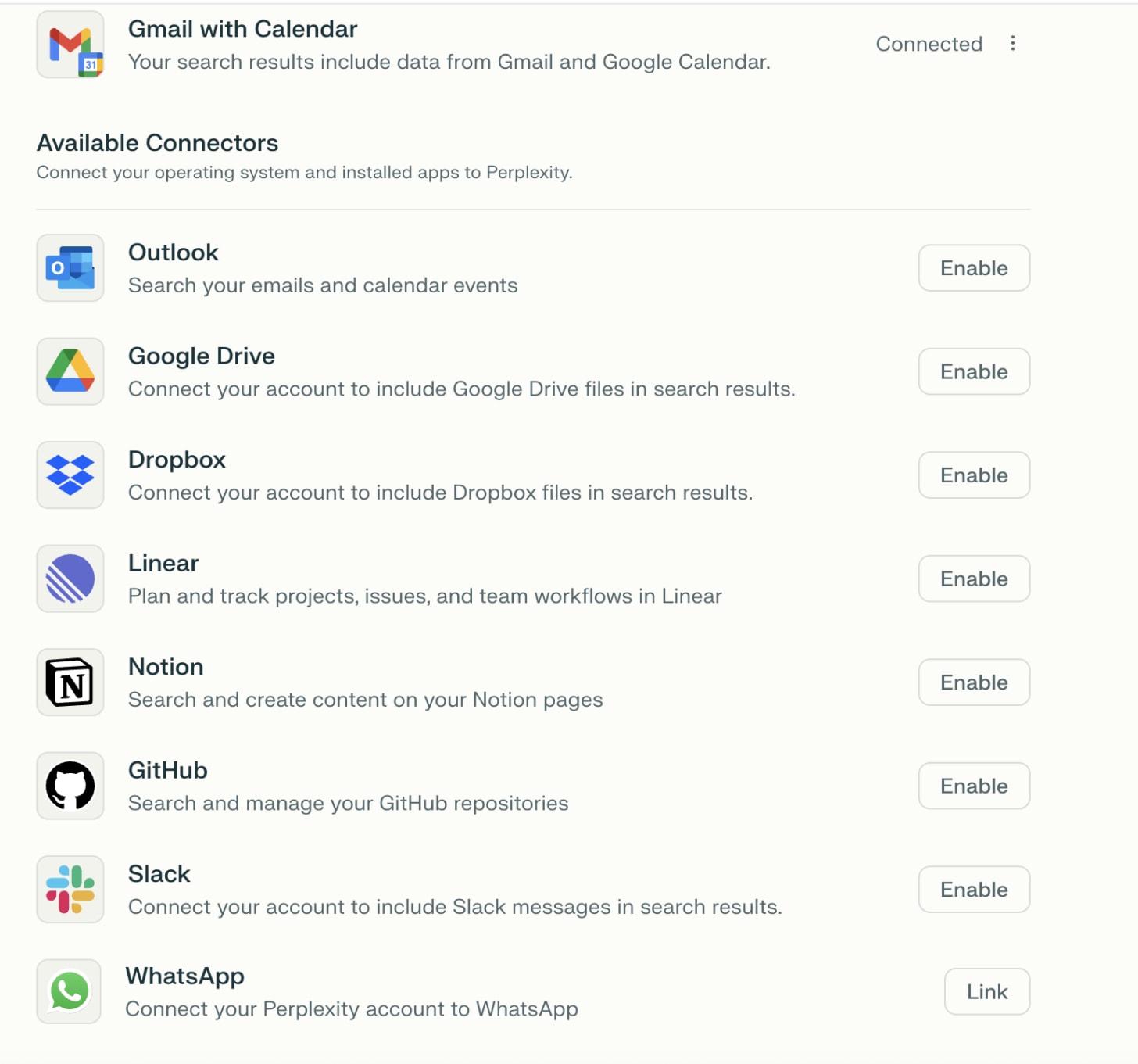

Image showing various application logos, representing essential connections for Comet, such as Gmail, Google Calendar, GitHub, and Notion.

Your Call to Action: Experience the Shift

The promise of Perplexity Comet is substantial. To truly grasp its potential, the challenge is to move beyond reading and actively engage with the tool. Pick one time-consuming browser task—be it email triage, research compilation, or shopping comparison—and dedicate five days to automating it with Comet. Track your time savings and refine your prompts based on the results. Even saving 30 minutes in a week can validate the concept and begin your journey toward a more productive digital future.

Comet, while not flawless, represents a significant leap forward in human-computer interaction. The question is no longer if AI browsers are the future—they unequivocally are—but how quickly you will embrace this new paradigm and transform your own workflow. Will you be among the early adopters reaping the benefits of reclaimed time and preserved attention, or will you wait for the rest to catch up?


You Might Also Like

Navigating the Neural Frontier: Strategic AI Product Leadership for Modern PMs

AI’s High-Stakes Bet: Analyzing ChatGPT’s Single-Stock Strategy in Week 9

Beyond Passion: Strategic Market Focus and Customer-Driven Revenue for Open Source Success

Beyond Compliance: How Ethical AI Governance Fuels Startup Success

Investigating the Onboarding Blunder: When Helping Becomes a Hostage Situation

Sign Up For Daily Newsletter

Be keep up! Get the latest breaking news delivered straight to your inbox.
[mc4wp_form]
By signing up, you agree to our Terms of Use and acknowledge the data practices in our Privacy Policy. You may unsubscribe at any time.
Share This Article
Facebook Copy Link Print
Share
Previous Article Gluwa's Potential Role in Shaping the Future of Digital Finance Gluwa’s Strategic Playbook: Bridging Innovation and Regulation in the Future of Digital Finance
Next Article The Data Infrastructure Behind Every Successful AI Startup From Concept to Conquest: Data Infrastructure as the AI Startup’s Ultimate Competitive Edge
Leave a Comment

Leave a Reply Cancel reply

Your email address will not be published. Required fields are marked *

Stay Connected

248.1kLike
69.1kFollow
134kPin
54.3kFollow
banner banner
Create an Amazing Newspaper
Discover thousands of options, easy to customize layouts, one-click to import demo and much more.
Learn More

Latest News

Clean Code: Functions and Error Handling in Go: From Chaos to Clarity [Part 1]
Unmasking the Code Clutter: An Investigative Look into Go Functions and Error Handling Best Practices
backend best-practices clean-code clean-go-functions golang pass-code-review programming software-engineering
How Online Stores Know What You’ll Buy Next: The Math Behind “Frequently Bought Together”
The Algorithmic Oracle: Unpacking How E-commerce Predicts Your Next Purchase Ever feel like your favorite online store has a crystal ball, anticipating your desires before you even click ‘add to cart’? That eerie precision in suggesting “frequently bought together” items isn’t magic, dear reader, but a masterful application of data science, specifically something called Association Rule Mining. And trust me, it’s far more fascinating than any fortune teller. The core idea, stripped of its intimidating jargon, is elegantly simple: find patterns, then exploit them. Think of it as the digital equivalent of a savvy corner shop owner who knows that if you buy milk, you probably also need bread. Only, instead of one shop owner observing a few dozen customers, we’re talking about algorithms analyzing billions of transactions from millions of shoppers. The “If This, Then That” Goldmine At its heart, Association Rule Mining is about discovering “if-then” relationships within vast datasets. Computers sift through mountains of past purchase data to automatically identify rules like: “If a customer buys product A and product B, there’s an X% chance they’ll also buy product C.” These aren’t just guesses; they’re statistically significant insights derived from actual consumer behavior. This isn’t merely about throwing random suggestions at you. These algorithms employ metrics like ‘support’ (how often item sets appear together) and ‘confidence’ (how likely ‘if A’ leads to ‘then B’) to ensure the suggestions are not just correlations, but strong, reliable patterns. It’s about more than just popularity; it’s about *relationship*. From Digital Aisles to Physical Shelves The immediate application we all encounter is, of course, online. Those “Customers who bought this also bought…” or “Frequently bought together” sections on Amazon, eBay, or your local grocery delivery app? That’s Association Rule Mining in action, subtly nudging you towards complementary items, boosting the average order value for businesses, and, let’s be honest, sometimes genuinely reminding us we needed those batteries for the new gadget. But its genius isn’t confined to the digital realm. The same principles are used to optimize the physical layout of stores. Ever wondered why milk is often at the back of the supermarket, necessitating a trek past alluring displays? Or why chips and soda are frequently placed near each other? That’s often the result of this very analysis. It helps retailers organize shelves smarter, strategically placing items to maximize impulse purchases and enhance the shopping flow. Beyond the Cart: A Glimpse into the Algorithmic Future The implications of such pattern recognition extend far beyond retail. Imagine it being applied to: Healthcare: Identifying symptom patterns that frequently lead to specific diagnoses. Cybersecurity: Spotting sequences of network activities that often precede a security breach. Content Recommendations: Suggesting your next binge-watch based on your viewing history and what other similar viewers enjoyed. The ability of computers to find these hidden connections automatically from huge amounts of data empowers businesses and even other sectors to make better, more data-driven decisions. The Double-Edged Sword of Predictive Power While undoubtedly convenient, enhancing our shopping experience and making businesses more efficient, it’s worth pausing to consider the deeper implications. As these algorithms become more sophisticated, predicting our behavior with unsettling accuracy, we must ask ourselves: are these suggestions truly serving *our* best interests, or are they subtly guiding us down a pre-determined path to consume more? Are we trading true serendipity and discovery for optimized efficiency, potentially boxing ourselves into algorithmic echo chambers of preference? In a world increasingly shaped by these unseen rules, how do we ensure we remain the choosers, not just the chosen?
association-rule-mining ecommerce ecommerce-marketplace ecommerce-store frequently-bought-together item-recommendations machine-learning recommendation-algorithm
Own Your Edge: Control your AI
Beyond the Brink: Unpacking the 95% Failure Rate in Retail Edge AI and How to Own Your Edge
AI ai-edge-computing ai-infrastructure computer-vision-ai edge-ai edge-computing own-your-edge retail-ai
The Road to Hell is Paved with Good DRY Intentions
DRY Intentions, Wet Outcomes: Navigating the Over-Engineered Minefield in Software Development
design-patterns dry engineering hackernoon-top-story modular-reasoning modularity software-development yagni

You Might also Like

OpenAI Codex CLI: Early, Buggy, but Aiming to Redefine How Developers Code With AI
AIai-native-developmentai-tinkerershackernoon-top-storyopenai-codexopenai-codex-cliopenai-codex-releasedopenai-open-source-cli

OpenAI Codex CLI: A Glimpse into the AI-Powered Evolution of Development Workflows

AgentKyles
AgentKyles
4 Min Read
Let’s Talk About Vibe Coding
AIalex-cloudstarprogrammingsoftware-developmentvibe-codingvibe-coding-benefitsvibe-coding-riskswho-is-vibe-coding-for

Decoding the Digital Aura: An Investigation into Vibe Coding and the AI Frontier

AgentKyles
AgentKyles
7 Min Read
Google to Invest $15 Billion in India for AI Hub in Visakhapatnam
AIai-hub-indiagoogle-ai-india-investmentgoogle-ai-investment-indiagoogle-india-ai-hubgoogle-india-investmentgoogle-investment-aigoogle-investment-india

Google’s Grand AI Vision: A $15 Billion Leap into India’s Digital Future in Visakhapatnam

AgentKyles
AgentKyles
5 Min Read
//

We influence 20 million users and is the number one business and technology news network on the planet

Quick Link

  • Contact
  • Blog
  • Complaint
  • Advertise

Support

Sign Up for Our Newsletter

Subscribe to our newsletter to get our newest articles instantly!

[mc4wp_form id=”1616″]

TechTonicTechTonic
Follow US
© 2022 Foxiz News Network. Ruby Design Company. All Rights Reserved.
Join Us!
Subscribe to our newsletter and never miss our latest news, podcasts etc..
[mc4wp_form]
Zero spam, Unsubscribe at any time.
Welcome Back!

Sign in to your account

Username or Email Address
Password

Lost your password?

