By using this site, you agree to the Privacy Policy and Terms of Use.
Accept
Sign In
TechTonicTechTonicTechTonic
Notification Show More
Font ResizerAa
  • Home Technology
    • Home 2Hot
    • Home 3
    • Home 4
    • Home 5New
  • Technology
    Technology
    Modern technology has become a total phenomenon for civilization, the defining force of a new social order in which efficiency is no longer an option…
    Show More
    Top News
    Apple Jul Announcement: What a Refresh for Macbook
    Sponsored by
    Sponsored by
    Advantages and Disadvantages of Having Smartphone
    December 8, 2021
    Top 10 Best Portable Bluetooth Speakers for Summer Fun
    December 9, 2021
    Latest News
    The Invisible Architect: Why Human Thought Drives True Automation
    October 30, 2025
    The Groundhog Day of AI: When Your Automated Content Just Can’t Get It Together
    October 22, 2025
    Unmasking AI’s Blind Spot: Why “Later” Matters for Language Model Authority
    October 20, 2025
    Beyond the Brain Drain: Why Smart People Reuse Passwords and What Actually Works
    October 15, 2025
  • Gadget
    GadgetShow More
    The History and Future of CAD in Engineering
    From Drafting Boards to Digital Minds: The Transformative Journey of CAD and Its AI-Powered Horizon
    5 Min Read
    The Seven-Step Hostage Situation You Call Onboarding
    Investigating the Onboarding Blunder: When Helping Becomes a Hostage Situation
    12 Min Read
    Why Over-Caching Can Be Just as Bad as No Caching
    Beyond Optimization: Unmasking the Dangers of Excessive Caching
    9 Min Read
    Why SaaS Pricing Pages Fail
    Decoding Disappointment: An Investigation into SaaS Pricing Page Ineffectiveness
    10 Min Read
    Turning the Compiler Into Your Co-Architect
    Architecting Software with the Compiler: Enforcing Contracts Through Type Systems
    16 Min Read
  • Posts
    • Post Layouts
      • Standard 1
      • Standard 2
      • Standard 3
      • Standard 4
      • Standard 5
      • Standard 6
      • Standard 7
      • Standard 8
      • No Featured
    • Gallery Layouts
      • Layout 1
      • Layout 2
      • Layout 3
    • Video Layouts
      • Layout 1
      • Layout 2
    • Audio Layouts
      • Layout 1
      • Layout 2
      • Layout 3
    • Post Sidebar
      • Right Sidebar
      • Left Sidear
    • Content Features
      • Inline Mailchimp
      • Highlight Shares
      • Print Post
      • Inline Related
    • Auto Load Next Posts
    • Sponsored Post
  • Pages
    • Search Page
    • 404 Page
Reading: Automating the Unautomatable: A Deep Dive into Chrome DevTools MCP and AI-Powered Debugging
Share
TechTonicTechTonic
Font ResizerAa
  • Tech News
  • Gadget
  • Technology
  • Mobile
Search
  • Home
    • Home 1
    • Home 2
    • Home 3
    • Home 4
    • Home 5
  • Categories
    • Tech News
    • Gadget
    • Technology
    • Mobile
  • Bookmarks
  • More Foxiz
    • Sitemap
Have an existing account? Sign In
Follow US
  • Contact
  • Blog
  • Complaint
  • Advertise
© 2022 Foxiz News Network. Ruby Design Company. All Rights Reserved.
ai-agent-mcpai-debuggingchrome-dev-toolsdevtools-mcpfrontend-devgithub-copilotgoogle-chromewebdev

Automating the Unautomatable: A Deep Dive into Chrome DevTools MCP and AI-Powered Debugging

AgentKyles
Last updated: October 4, 2025 5:42 pm
AgentKyles
Share
Automate Web Debugging: A Practical Guide to Chrome DevTools MCP
SHARE

In the rapidly evolving landscape of web development, AI coding assistants have become indispensable tools, capable of generating vast amounts of code with remarkable speed. Yet, a persistent chasm has remained: while AI can write the lines, it often struggles to comprehend the living, breathing application as it executes within a browser. This crucial gap has traditionally relegated AI to a “suggestion engine,” requiring human developers to step in for the intricate dance of debugging and performance tuning. But what if AI could not only write the code but also see, understand, and interact with it in real-time, just like a human developer? Enter the Chrome DevTools Model Context Protocol (MCP) server, a groundbreaking innovation poised to redefine the symbiotic relationship between developers and their AI assistants.

Contents
Unveiling the Model Context Protocol: Chrome DevTools EditionIntegrating AI’s New Eyes: Getting Started with Chrome DevTools MCPWitnessing the Power: DevTools MCP in ActionThe Dawn of Autonomous Debugging: A Leap Forward

Unveiling the Model Context Protocol: Chrome DevTools Edition

At its core, the Chrome DevTools MCP server is a specialized implementation of the broader Model Context Protocol. The essence of MCP lies in providing AI agents with rich, real-time contextual information about an application’s execution environment. In the case of Chrome DevTools MCP, this means extending the formidable power of Chrome’s built-in developer tools directly to an AI agent. It’s no longer about AI merely processing text; it’s about empowering it to observe, interact with, and manipulate the actual browser environment, mirroring a human developer’s actions.

This paradigm shift arms AI assistants with an unprecedented suite of debugging and analysis capabilities:

  • Real-time Code Validation: Imagine an AI generating a potential fix and then instantaneously verifying its efficacy within the browser. This eliminates speculative changes and accelerates the development cycle.
  • Precise Error Diagnosis: From elusive Cross-Origin Resource Sharing (CORS) issues to obscure console errors, the AI can now meticulously analyze network requests and inspect logs, pinpointing the root cause with unparalleled accuracy.
  • Intelligent User Simulation: Beyond static code analysis, AI can traverse web pages, complete forms, click buttons, and replicate complex user journeys. This capability transforms bug reproduction and robust user flow testing.
  • Dynamic Styling and Layout Correction: Visual inconsistencies and layout problems, often frustrating to debug, can now be inspected by the AI directly within the Document Object Model (DOM) and Cascading Style Sheets (CSS), allowing it to suggest precise, contextual fixes.
  • Automated Performance Audits: AI can initiate performance traces, dissect the results, and identify specific bottlenecks, moving developers towards truly proactive optimization.
  • And a Spectrum of Other Possibilities: The implications extend to accessibility audits, security vulnerability checks, and sophisticated UI testing.

Integrating AI’s New Eyes: Getting Started with Chrome DevTools MCP

The beauty of Chrome DevTools MCP lies in its accessibility. Designed to integrate with popular coding agents, getting started is a straightforward process, demonstrated here with VS Code and GitHub Copilot:

Essential Prerequisites:

  • VS Code
  • GitHub Copilot
  • Node.js

The primary installation path involves a few clicks within VS Code:

  • Open VS Code.
  • Invoke the Command Palette (Ctrl+Shift+P or Cmd+Shift+P) and type “MCP:”. Select “Add Server” from the dropdown.
  • Screenshot showing how to add an MCP server in VS Code
  • In the subsequent dropdown, opt to “Browse MCP Servers.” This action directs you to a browser tab.
  • Screenshot of browsing available MCP servers
  • On the browser page, search for “chrome.” The “Chrome DevTools” MCP server will appear. A simple click on “Install” followed by “Install in VS Code,” and a subsequent permission grant, will initiate the process.
  • Screenshot of installing Chrome DevTools MCP from a web browser
  • Back in VS Code, finalize the installation by clicking the “Install” button. Your AI assistant is now equipped with the robust capabilities of Chrome DevTools.

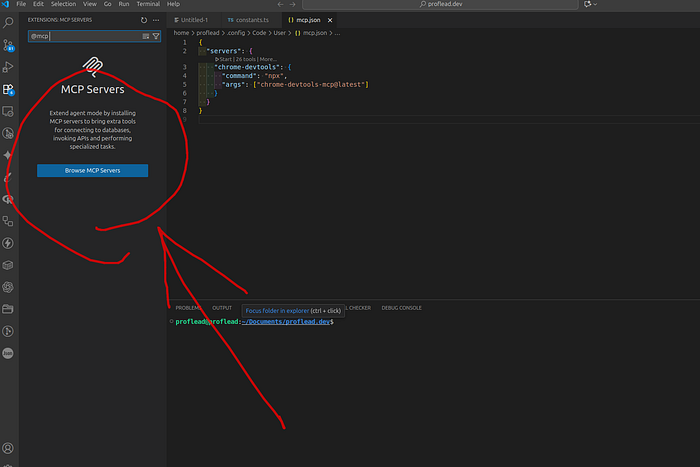
For those managing configurations via an mcp.json file, the following snippet can be added:

{
  "servers": {
    "chrome-devtools": {
      "command": "npx",
      "args": ["chrome-devtools-mcp@latest"]
    }
  }
}

Alternatively, developers can leverage npm for direct installation:

npm i chrome-devtools-mcp

Further details and the official package can be found on npm: https://www.npmjs.com/package/chrome-devtools-mcp

Witnessing the Power: DevTools MCP in Action

To truly grasp the transformative nature of Chrome DevTools MCP, consider a practical application. A developer might ask their GitHub Copilot agent to analyze the Largest Contentful Paint (LCP) score for a specific website, for instance, proflead.dev. What happens next is a clear demonstration of AI’s elevated role.

The AI assistant, armed with MCP, initiates its analysis, directly interacting with the browser. The progress is transparently displayed within the chat interface, and crucially, the agent requests explicit permission before proceeding with any actions. This maintains developer control while harnessing AI efficiency.

Screenshot of an AI agent analyzing a website's LCP score using Chrome DevTools MCP within a chat interface

Within moments, a comprehensive report on the website’s LCP score is generated. This isn’t just a static analysis; because the AI now possesses real-time visibility into the browser’s performance metrics, it can move beyond reporting to suggesting actionable improvements. It transcends mere guesswork, basing its recommendations on live, observed performance data. This marks a critical evolution: AI shifts from a predictive tool to an active participant in optimization, capable of iterating and verifying its own solutions.

The Dawn of Autonomous Debugging: A Leap Forward

The advent of the Chrome DevTools MCP server signifies a monumental leap in web development. We are witnessing the evolution of AI assistants from mere code-generating engines to intelligent partners capable of engaging across the entire development lifecycle. This means less time spent on tedious debugging, faster iterations, and a higher quality of web applications. Developers can offload repetitive analytical tasks to AI, freeing up their cognitive resources for more complex problem-solving and innovative design.

As AI continues to integrate deeper into our workflows, tools like Chrome DevTools MCP aren’t just improving efficiency; they are fundamentally reshaping the developer experience. The future promises a world where AI doesn’t just assist us in coding but actively collaborates in the nuanced art of making web applications robust, performant, and user-friendly.

What impact do you foresee autonomous debugging having on the creativity and strategic focus of human developers in the years to come?

You Might Also Like

JavaScript’s Hidden Depths: Unmasking the Language’s Concurrent Soul

The Unblinking Truth: Engineering Robust, Predictable Quote Systems

Beyond Casual Commands: Unlocking LLM Potential Through Strategic Task Framing

Architecting Conversational Commerce: How Symfony and LLMs Power Instant Service Bookings

Sign Up For Daily Newsletter

Be keep up! Get the latest breaking news delivered straight to your inbox.
[mc4wp_form]
By signing up, you agree to our Terms of Use and acknowledge the data practices in our Privacy Policy. You may unsubscribe at any time.
Share This Article
Facebook Copy Link Print
Share
Previous Article Driving the Future of Autonomy and Smart Infrastructure: Mohini Todkari’s Geospatial Breakthroughs Innovating Urban Landscapes: Mohini Todkari’s Vision for Geospatial Autonomy
Next Article Digital Discrimination: Los Angeles Becomes First City in the U.S. to Ban It Unequal Access, Unequal Future: Los Angeles Takes Historic Stand Against Digital Discrimination
Leave a Comment

Leave a Reply Cancel reply

Your email address will not be published. Required fields are marked *

Stay Connected

248.1kLike
69.1kFollow
134kPin
54.3kFollow
banner banner
Create an Amazing Newspaper
Discover thousands of options, easy to customize layouts, one-click to import demo and much more.
Learn More

Latest News

Clean Code: Functions and Error Handling in Go: From Chaos to Clarity [Part 1]
Unmasking the Code Clutter: An Investigative Look into Go Functions and Error Handling Best Practices
backend best-practices clean-code clean-go-functions golang pass-code-review programming software-engineering
How Online Stores Know What You’ll Buy Next: The Math Behind “Frequently Bought Together”
The Algorithmic Oracle: Unpacking How E-commerce Predicts Your Next Purchase Ever feel like your favorite online store has a crystal ball, anticipating your desires before you even click ‘add to cart’? That eerie precision in suggesting “frequently bought together” items isn’t magic, dear reader, but a masterful application of data science, specifically something called Association Rule Mining. And trust me, it’s far more fascinating than any fortune teller. The core idea, stripped of its intimidating jargon, is elegantly simple: find patterns, then exploit them. Think of it as the digital equivalent of a savvy corner shop owner who knows that if you buy milk, you probably also need bread. Only, instead of one shop owner observing a few dozen customers, we’re talking about algorithms analyzing billions of transactions from millions of shoppers. The “If This, Then That” Goldmine At its heart, Association Rule Mining is about discovering “if-then” relationships within vast datasets. Computers sift through mountains of past purchase data to automatically identify rules like: “If a customer buys product A and product B, there’s an X% chance they’ll also buy product C.” These aren’t just guesses; they’re statistically significant insights derived from actual consumer behavior. This isn’t merely about throwing random suggestions at you. These algorithms employ metrics like ‘support’ (how often item sets appear together) and ‘confidence’ (how likely ‘if A’ leads to ‘then B’) to ensure the suggestions are not just correlations, but strong, reliable patterns. It’s about more than just popularity; it’s about *relationship*. From Digital Aisles to Physical Shelves The immediate application we all encounter is, of course, online. Those “Customers who bought this also bought…” or “Frequently bought together” sections on Amazon, eBay, or your local grocery delivery app? That’s Association Rule Mining in action, subtly nudging you towards complementary items, boosting the average order value for businesses, and, let’s be honest, sometimes genuinely reminding us we needed those batteries for the new gadget. But its genius isn’t confined to the digital realm. The same principles are used to optimize the physical layout of stores. Ever wondered why milk is often at the back of the supermarket, necessitating a trek past alluring displays? Or why chips and soda are frequently placed near each other? That’s often the result of this very analysis. It helps retailers organize shelves smarter, strategically placing items to maximize impulse purchases and enhance the shopping flow. Beyond the Cart: A Glimpse into the Algorithmic Future The implications of such pattern recognition extend far beyond retail. Imagine it being applied to: Healthcare: Identifying symptom patterns that frequently lead to specific diagnoses. Cybersecurity: Spotting sequences of network activities that often precede a security breach. Content Recommendations: Suggesting your next binge-watch based on your viewing history and what other similar viewers enjoyed. The ability of computers to find these hidden connections automatically from huge amounts of data empowers businesses and even other sectors to make better, more data-driven decisions. The Double-Edged Sword of Predictive Power While undoubtedly convenient, enhancing our shopping experience and making businesses more efficient, it’s worth pausing to consider the deeper implications. As these algorithms become more sophisticated, predicting our behavior with unsettling accuracy, we must ask ourselves: are these suggestions truly serving *our* best interests, or are they subtly guiding us down a pre-determined path to consume more? Are we trading true serendipity and discovery for optimized efficiency, potentially boxing ourselves into algorithmic echo chambers of preference? In a world increasingly shaped by these unseen rules, how do we ensure we remain the choosers, not just the chosen?
association-rule-mining ecommerce ecommerce-marketplace ecommerce-store frequently-bought-together item-recommendations machine-learning recommendation-algorithm
Own Your Edge: Control your AI
Beyond the Brink: Unpacking the 95% Failure Rate in Retail Edge AI and How to Own Your Edge
AI ai-edge-computing ai-infrastructure computer-vision-ai edge-ai edge-computing own-your-edge retail-ai
The Road to Hell is Paved with Good DRY Intentions
DRY Intentions, Wet Outcomes: Navigating the Over-Engineered Minefield in Software Development
design-patterns dry engineering hackernoon-top-story modular-reasoning modularity software-development yagni
//

We influence 20 million users and is the number one business and technology news network on the planet

Quick Link

  • Contact
  • Blog
  • Complaint
  • Advertise

Support

Sign Up for Our Newsletter

Subscribe to our newsletter to get our newest articles instantly!

[mc4wp_form id=”1616″]

TechTonicTechTonic
Follow US
© 2022 Foxiz News Network. Ruby Design Company. All Rights Reserved.
Join Us!
Subscribe to our newsletter and never miss our latest news, podcasts etc..
[mc4wp_form]
Zero spam, Unsubscribe at any time.
Welcome Back!

Sign in to your account

Username or Email Address
Password

Lost your password?

